Parse any dice notation. Roll anything. Ship faster.
Dice Roller Pro is a high-performance Unity library that brings the full power of tabletop dice notation to your game with a single line of C#. From 3d6+2 to {4d6kh3}!, every expression you need for a tabletop RPG, roguelike, or board game is supported out of the box.
Why Dice Roller Pro?
Most dice solutions in Unity handle the simple cases: roll a d6, roll a d20. They break down the moment your game needs advantage/disadvantage rolls, exploding dice, Fate dice for PBTA games, or custom polyhedral faces. Dice Roller Pro solves all of these with one unified, expression-based API that your designers can read and your code can trust.
Key Features
- One-Line Static API
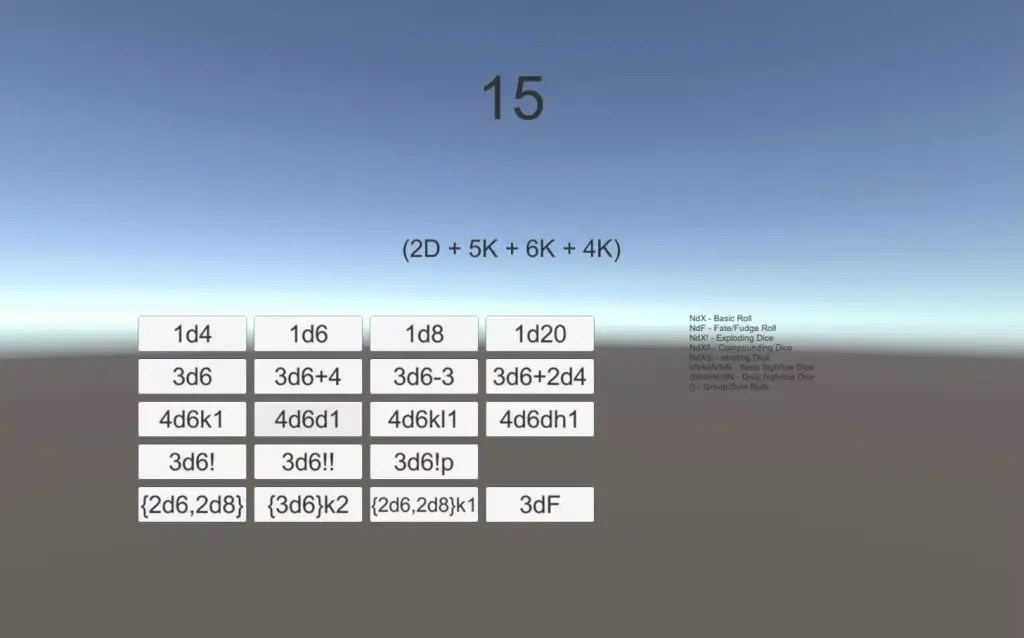
TheDicestatic class gives you throwing and non-throwing entry points –Dice.Roll(),Dice.TryRoll(),Dice.Parse(),Dice.TryParse()– backed by a thread-safe parser and a warm expression cache. No setup, no instantiation. - Full Dice Notation Parser
Parses standard and extended dice notation with full arithmetic. Operator precedence follows PEMDAS, so3d6*2+1evaluates exactly as you expect. Unary minus, modulo, and nested parentheses all work. - Exploding Dice
Three explosion modes: basic (!), compound (!!), and penetrating (!p). A built-in chain cap (100 rolls) prevents infinite loops on pathological inputs like1d1!. - Keep / Drop Modifiers
Keep highest, keep lowest, drop highest, drop lowest – all combinable.4d6kh3for D&D ability scores.2d20kh1for advantage. Any combination you can express, the parser understands. - Custom and Fate Dice
Define any set of face values with3d[2,4,6,8]. Supports weighted faces (repeated values) and negative faces. Four Fate/Fudge dice? Just write4dF. - ScriptableObject Assets
Create dice configurations as.assetfiles via Assets → Create → Dice Roller Pro. Assign them in the Inspector, version-control them alongside your scenes, and swap them without touching code. - Unity Editor Tooling
- Live Expression Validator window (Window → Dice Roller Pro → Expression Validator)
- Roll Preview panel on every dice asset (min / max / average / last breakdown)
- Reorderable child editor for Group and Sequence assets
- Guided Modifiers drawer that enforces mutual exclusivity
- Validation Framework
DiceValidatorreturns rich results with severity levels (Critical, Error, Warning, Info), categories (Syntax, Logic, Performance, Configuration), and fix suggestions – without throwing exceptions. - High Performance
Span-based allocation-free parsing, thread-local StringBuilder pooling, expression caching, and O(1) keep/drop sorting keep hot paths lean even at scale.
Purchase the Dice Roller Pro from the Unity Asset Store here >>
Supported Dice Notation
Basic Rolls
| Expression | Description |
|---|---|
1d6 | Single six-sided die |
3d8 | Three eight-sided dice |
2d20+5 | Two d20 plus 5 |
(1d6+2)*3 | Parenthesized expression |
-1d6+10 | Unary minus on leading term |
Keep / Drop Modifiers
| Expression | Description |
|---|---|
4d6kh3 | Keep highest 3 of 4d6 |
5d8kl2 | Keep lowest 2 of 5d8 |
6d6dh1 | Drop highest 1 of 6d6 |
4d6dl1 | Drop lowest 1 of 4d6 |
Exploding Dice
| Expression | Description |
|---|---|
3d6! | Basic exploding (roll again on max) |
4d8!! | Compound exploding (add to same die) |
2d10!p | Penetrating (−1 on rerolls) |
Special Dice Types
| Expression | Description |
|---|---|
4dF | Fate / Fudge dice (−1, 0, +1 each) |
1d% | Percentile die (1–100) |
1d100 | Percentile die (equivalent) |
3d[2,4,6,8] | Custom face values |
2d[-1,0,1] | Custom negative faces |
Groups and Advanced Expressions
| Expression | Description |
|---|---|
{2d6,1d8}kh2 | Pool: keep best 2 results |
{3d6!,2d8} | Mixed dice in a group |
1d20+{4d6}kh3 | Inline group inside a sequence |
Arithmetic
| Expression | Description |
|---|---|
1d8+1d6+3 | Addition |
2d6*1d4 | Multiplication |
(2d6+3)/2 | Division with grouping |
1d100%6 | Modulo (same precedence as * and /) |
Operator precedence:
*,/, and%bind tighter than+and-. Parentheses override everything. A leading+,-,*, or/is treated as a unary prefix.
Getting Started
1. Import the Package
Download from the Unity Asset Store and import into your project. Requires Unity 2022.3 LTS or newer (.NET Standard 2.1, C# 9.0).
2. Roll with the Static API
The fastest path: call Dice.Roll() anywhere in your MonoBehaviour. No instantiation needed.
using DiceRollerPro;

// Throwing overload — use when you control the expression
int total = Dice.Roll("3d6+2");

// Non-throwing — ideal for user-supplied input
if (Dice.TryRoll("4d6kh3", out int stat, out string error))
    Debug.Log($"Stat: {stat}");

// Full result tree with per-die breakdown
if (Dice.TryRoll("3d6", new System.Random(), out IResult result, out _))
    Debug.Log(RollExplainer.Explain(result)); // e.g. "(4 + 3 + 5)"

// Parse once, roll many — cache-backed
var advantage = Dice.Parse("2d20kh1");
var rng = new System.Random();
for (int i = 0; i < 5; i++)
    Debug.Log(advantage.GenerateValue(rng).Value);
3. Optionally Create Dice Assets
Right-click in the Project window → Create → Dice Roller Pro → Normal Dice to build a reusable ScriptableObject asset. Drag it onto any MonoBehaviour field in the Inspector.
public class CharacterSheet : MonoBehaviour
{
    [SerializeField] private BaseRoll attackRoll;   // Assign in Inspector
    [SerializeField] private BaseRoll damageRoll;   // e.g. 2d6+3 asset

    private readonly System.Random random = new System.Random();

    public void Attack()
    {
        var attackResult = attackRoll.GenerateValue(random);
        var damageResult = damageRoll.GenerateValue(random);
        Debug.Log($"Attack: {attackResult.Value} — {RollExplainer.Explain(attackResult)}");
        Debug.Log($"Damage: {damageResult.Value} — {RollExplainer.Explain(damageResult)}");
    }
}
4. Validate Expressions
Open Window → Dice Roller Pro → Expression Validator to test any expression live – parser preview, sample roll, and validation issues with severity levels.
Dice Types
Normal Dice (NormalDice)
Standard polyhedral dice – d4, d6, d8, d10, d12, d20, d100. Supports all modifiers: keep/drop, exploding, and compound combinations.
Percentile Dice (PercentileDice)
Rolls values from 1 to 100. Use 1d% or 1d100 in notation. Supports exploding mechanics: a roll of 100 triggers another roll.
Fate / Fudge Dice (FateDice)
Each die produces −1, 0, or +1 with equal probability. Four Fate dice (4dF) give a result between −4 and +4, perfect for PBTA and FATE system games.
Custom Dice (CustomDice)
User-defined face values instead of sequential numbers. Supports weighted faces (repeated values in the array), negative faces, and all standard modifiers. Create via Inspector or parser: 3d[2,4,6,8].
Groups (Group)
Pool multiple dice types under shared modifiers. {2d6, 1d8}kh2 rolls all three dice and keeps the two highest individual results.
Sequences (Sequence)
Mathematical combinations of rolls: addition, subtraction, multiplication, division, and modulo. Parsed from standard arithmetic expressions like 1d20+5 or (2d6+3)/2.
Unity Editor Integration
Expression Validator Window
Window → Dice Roller Pro → Expression Validator
Type any expression to see the parsed structure, a sample roll value, and all validation issues annotated with severity and fix suggestions. The fastest way to test notation during development.
Roll Preview Panel
Every dice asset shows a Roll Preview block at the bottom of its Inspector. Set an iteration count, hit Roll, and see live min / max / average / last-value readouts plus the full explanation of the last roll. Exceptions surface inline — no editor crashes.
Reorderable Child Editor
Group and Sequence assets render their child rolls as a reorderable list. The + button opens a menu of all concrete BaseRoll types. Removing a child destroys the nested sub-asset cleanly.
Modifiers Drawer
The raw Modifiers struct is replaced by a guided UI: keep/drop collapses to a single kind + value row (Keep Highest / Keep Lowest / Drop Highest / Drop Lowest), and the three explode flavours collapse into a single dropdown (None / Explode / Compound / Penetrating). Mutual exclusivity is enforced automatically.
Validation Framework
DiceValidator provides non-throwing validation for expressions, parameters, and ScriptableObject configurations.
using DiceRollerPro.Validation;

// Validate a user-typed expression before rolling
var result = DiceValidator.ValidateExpression(userInput);
if (!result.IsValid)
{
    foreach (var issue in result.Issues)
        Debug.LogError($"[{issue.Severity}] {issue.Category}: {issue.Message}");
    return;
}
Severity Levels
| Level | Meaning |
|---|---|
| Critical | Blocks operation (syntax errors, null references) |
| Error | Should be fixed (invalid parameters, logic conflicts) |
| Warning | Potential problems (high dice count, unusual config) |
| Info | Informational (non-standard dice size, optimization hints) |
Validation Categories
Syntax · Parameters · Logic · Performance · Configuration · Convention
Parser Safety Limits
Built-in caps prevent pathological inputs from consuming unbounded CPU or stack space.
| Limit | Default | Behaviour when exceeded |
|---|---|---|
MaxInputLength | 10,000 chars | Throws SyntaxException |
MaxRecursionDepth | 64 levels | Throws SyntaxException |
MaxRollNodes | 5,000 nodes | Throws SyntaxException |
MaxCompoundChain | 100 rolls | Chain stops silently; partial total returned |
Technical Specifications
| Property | Value |
|---|---|
| Unity version | 2022.3 LTS and newer |
| Target framework | .NET Standard 2.1 |
| C# language level | C# 9.0 |
| Thread safety | Full – static API uses per-thread parser and RNG |
| Assembly | Compiles into Assembly-CSharp (no .asmdef required) |
Purchase the Dice Roller Pro from the Unity Asset Store here >>
Frequently Asked Questions
Do I need to instantiate anything to start rolling?
No. Dice.Roll("3d6") is all you need. The static Dice class owns a thread-safe Parser instance and a warm expression cache internally.
Can I use dice assets in the Inspector instead of writing expressions?
Yes. Create a dice asset via Assets → Create → Dice Roller Pro, assign it to a [SerializeField] BaseRoll field, and call myDice.GenerateValue(rng) at runtime.
Is the parser safe against user-supplied input?
Yes. MaxInputLength (10,000), MaxRecursionDepth (64), and MaxRollNodes (5,000) caps are enforced before any allocation-heavy work. Use Dice.TryRoll() or DiceValidator.ValidateExpression() to surface errors to users without catching exceptions yourself.
Does it work in WebGL or mobile builds?
The library targets .NET Standard 2.1 with no platform-specific APIs. Unity WebGL, iOS, and Android are all supported.
What dice types are available without writing expressions?
Normal (d4–d100), Percentile (d%), Fate/Fudge, Custom (any face values), Group, Sequence, and Number (static modifier values).
Screenshots